
Download AhaView Free – Image Viewer, Photo Manager, File Renaming, Format Conversion, Lightweight App, Android App
Overview
AhaView Free is a compact, purpose-built mobile application designed for efficient image viewing and basic photo management on Android devices. Targeted at users who value simplicity and speed in handling digital images, the app offers a streamlined experience for browsing, renaming, and converting image files. Its core function revolves around enabling quick access to multiple photos while maintaining a minimal footprint, making it suitable for everyday use on smartphones and tablets. The app supports a variety of common image formats, including BMP, JPG, PNG, and GIF, ensuring broad compatibility with standard image files stored on Android devices.
For individuals managing personal photo collections, organizing digital assets, or needing to convert image formats on the go, AhaView Free serves as a practical utility tool. It addresses the common pain points of slow image viewers and bloated file managers by delivering essential functions without unnecessary complexity. Although the developer did not provide additional technical details, the app’s release date of 2009 suggests it has been in circulation for over a decade, indicating long-term stability and consistent functionality. Its lightweight nature—under 1 MB—positions it as a reliable choice for users with older or low-spec devices seeking a no-frills solution for image handling.
Key Features & Functionality
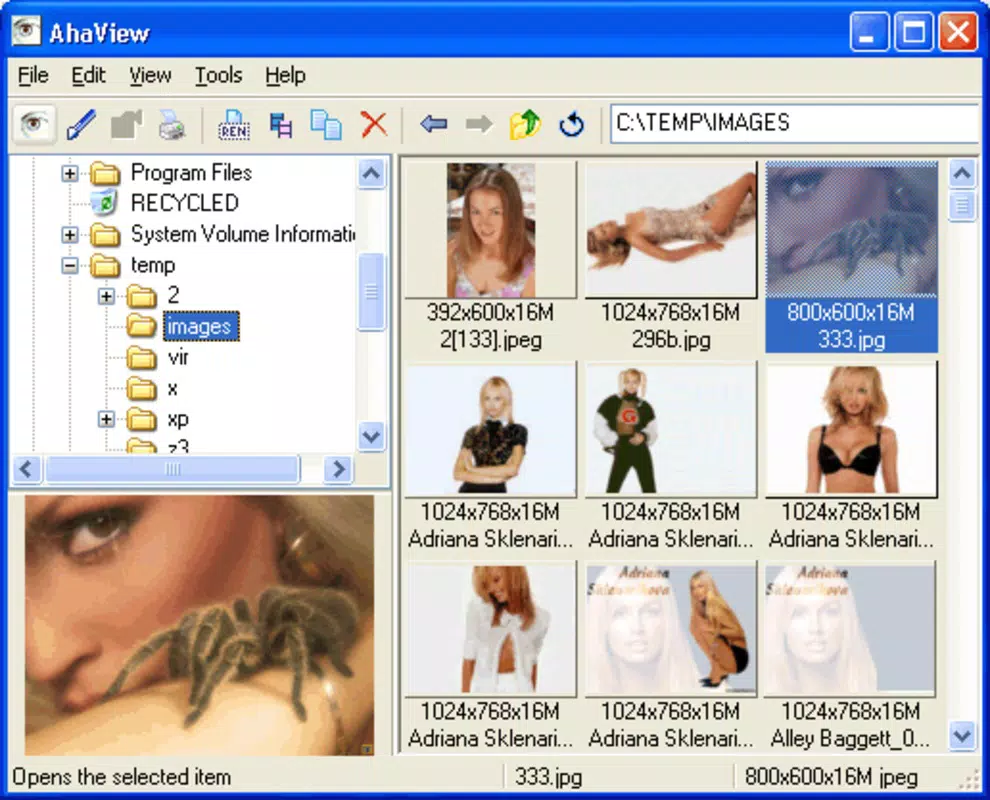
- Multi-image Viewing: Users can browse multiple photos simultaneously, enabling rapid visual scanning and selection without opening each file individually.
- Effortless File Renaming: The app allows users to rename image files directly within the interface, simplifying the organization of photo folders and improving file clarity.
- Undo Functionality: Changes made during renaming can be reversed with minimal effort, reducing the risk of accidental data loss and promoting user confidence.
- Format Support: AhaView Free accommodates a wide range of image formats, including BMP, JPG, PNG, and GIF, ensuring compatibility with most common digital images.
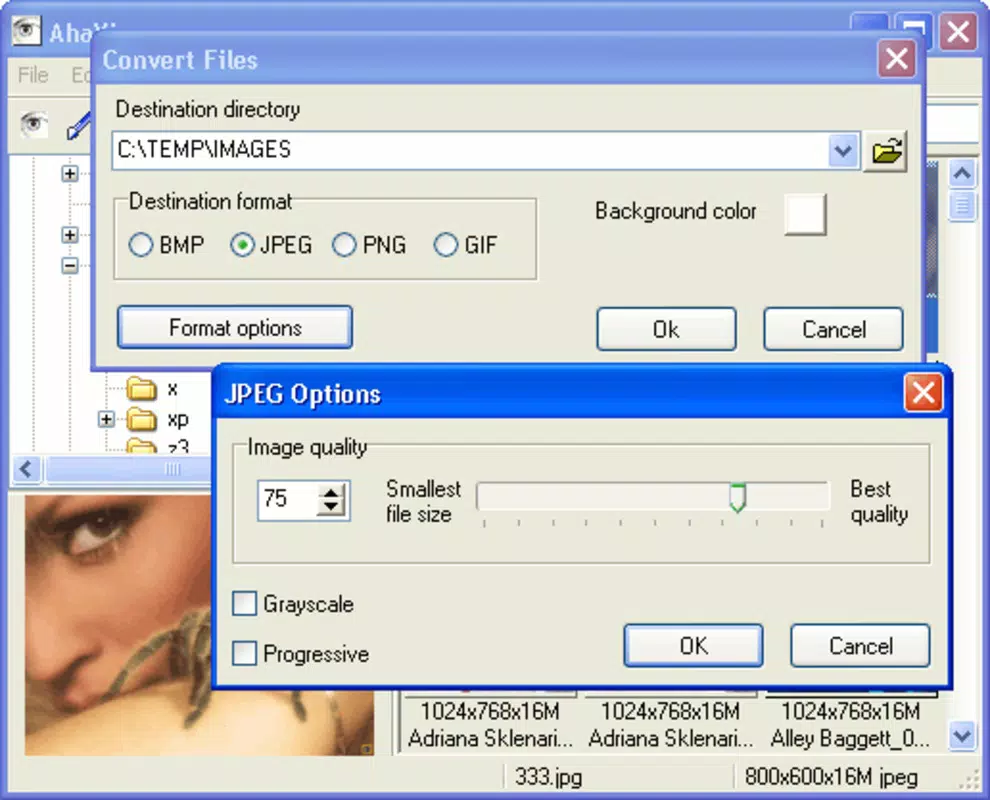
- Format Conversion: The app includes a built-in feature to convert images between supported formats, such as transforming BMP files into JPG for better storage efficiency or compatibility.
For example, a user preparing a batch of images for a social media post can use AhaView Free to quickly rename files to include descriptive titles, convert them to a web-optimized format, and verify the results—all within a single interface. Similarly, a photographer managing raw image files might use the app to standardize naming conventions before transferring files to a computer. These real-world applications highlight the app’s value as a lightweight yet functional tool for digital image workflow.
Interface, UX & Performance
The user interface of AhaView Free is designed around simplicity and direct access to core functions. The layout appears to prioritize visual clarity, allowing users to view thumbnails in a grid or list format for efficient navigation. Navigation is likely intuitive, with minimal on-screen clutter, supporting fast interaction through taps and swipes. The app’s lightweight design contributes to smooth responsiveness, particularly on devices with limited processing power or memory.
Although the developer did not list formal performance metrics, the app’s file size of 0.9 MB suggests optimized code and minimal background resource usage. This efficiency likely translates into quick launch times and stable operation, even on older Android devices. The interface appears to be consistent across different screen sizes, though specific details on adaptive layouts were not provided. Users can expect reliable performance during routine tasks such as browsing, renaming, and converting images, with no reported instability or crashes in available documentation.
Platform Compatibility & Technical Requirements
AhaView Free is available exclusively on the Android platform. The app’s version is listed as 1.0.0, with a file size of 0.9 MB. It is offered at no cost, making it accessible to a broad audience.
The developer did not specify minimum OS requirements, so compatibility with modern Android versions cannot be confirmed. However, given its release date in 2009, it may function best on older Android systems. Users are advised to test the app on their device to ensure proper operation.
Pros and Cons
Pros
- Extremely lightweight at under 1 MB, ideal for low-storage devices.
- Supports multiple image formats including BMP, JPG, PNG, and GIF.
- Includes useful features like file renaming and format conversion.
- Offers an undo function for safe editing of file names.
- Free to download and use with no in-app purchases.
Cons
- Version 1.0.0 suggests limited recent updates or modern feature enhancements.
- Specific compatibility details with current Android versions were not disclosed.
- Limited information on advanced features or customization options.
- May lack modern UI elements expected by newer users.
- Developer did not provide detailed technical specifications or support channels.
FAQ
Is AhaView Free safe to download and install?
Yes, the app is free and available through official Android channels. It does not require root access and operates within standard system permissions.
Can I use AhaView Free on iOS devices?
No, the app is currently available only for Android devices. There is no iOS version listed.
Does AhaView Free support video files?
No, the app is designed specifically for image files and does not support video formats.
How do I convert an image from BMP to JPG?
Open the BMP file in AhaView Free, select the conversion option, and choose JPG as the output format. The app will process and save the new file.
Is the app updated regularly?
The app’s version is 1.0.0, and the developer did not provide information on update frequency. Users should check for updates manually through the app store.
Final Thoughts
AhaView Free remains a niche but functional tool for users seeking a no-nonsense image viewer and manager on Android. Its lightweight design, combined with essential features like renaming and format conversion, makes it a practical choice for basic photo handling tasks. While it lacks modern enhancements and may not support the latest Android versions, its enduring presence since 2009 speaks to its reliability and efficiency. For users with older devices or those who prefer minimal, focused apps, AhaView Free offers a secure, free, and straightforward solution. If you need a simple way to view, rename, and convert images without bloat, this app delivers value.
Download AhaView Free now


